AI Marketing Automation
AI Creative Production System
Built an operational creative production layer that turns approved briefs into carousel, LinkedIn, and Reels assets, with automated rendering, delivery, failure handling, and human creative review.
The content plan was ready. Production was still the bottleneck.
Research and content planning could already produce topics, hooks, captions, scripts, and creative briefs. The next constraint was turning those briefs into usable visual assets without asking one AI model to make every creative decision at once.
Research and strategy could be ready while actual carousel, LinkedIn, or Reels production still required a separate execution step.
The first carousel approach asked an image model to handle the visual, typography, text placement, and final composition together. It worked technically, but the visual quality was below the standard I wanted.
An interior brand already has valuable first-party project imagery. Forcing AI-generated visuals into every slide would reduce authenticity instead of improving the work.
Image generation, video jobs, uploads, rendering, and external APIs can fail or time out. A usable production system needed logging and alerts, not only generation.
Separate the creative jobs, then automate the production path.
The Creative Agent receives an approved brief through a live Dispatcher. It routes the request into Carousel, LinkedIn, or Reels production. The most mature branch, Carousel, now runs from visual direction through final PNG slide generation and delivery inside the automation.
Built as a production system, not a single image prompt.
A separate production URL loads available Creative Brief topics, lets me select the topic, and routes the request into Carousel, LinkedIn, Reels, or multiple branches.
The Carousel Visual Director decides per slide whether real Estetiik project photography or an AI-generated visual is the better source. AI is not forced into every asset.
Headline and body copy stay outside the generated image. Visuals are combined with a controlled HTML/CSS layout so typography, spacing, progress, and slide structure remain consistent.
The current Carousel branch builds the HTML, sends it through an automated rendering step, extracts the rendered package, splits the PNG slides, uploads them, logs success, and delivers the result.
The Reels branch submits an asynchronous video job, waits, polls completion, handles timeout conditions, downloads the finished video, uploads it, updates the sheet, and sends a success notification.
High-risk nodes across Carousel, LinkedIn, and Reels can tag failures, write them into a shared log, and trigger a Telegram failure notification instead of silently stopping.
A creative brief can now move much further without manual production handoffs.
This case demonstrates working production capability and reduced manual steps. No engagement lift, conversion lift, or quantified time-saving claim is made without measurement.
Less scattered activity. More operating clarity.
The first version asked the image model to create the visual, typography, and final slide in one shot.
Visual generation, copy, layout, rendering, and final asset delivery are handled as separate responsibilities.
AI-generated imagery risked becoming the default even when real project proof was stronger.
The workflow can choose between curated Estetiik photography and AI-generated visuals per slide.
Text baked into generated images made typography and hierarchy inconsistent.
Headline and body are rendered separately inside a controlled HTML/CSS carousel structure.
The improved HTML carousel still required a manual export step outside n8n.
The current workflow renders the carousel automatically and produces final PNG slides inside the production pipeline.
Video generation required manual waiting, checking, retrieving, and uploading.
The Reels branch automates job submission, polling, download, upload, logging, and notification.
An external generation or upload failure could stop the workflow without a clean operating signal.
Shared failure tagging, logging, and Telegram alerts make production issues visible.
The current workflow is already doing real production work.
These diagrams summarize the current Carousel and routing architecture without exposing raw backend screenshots.
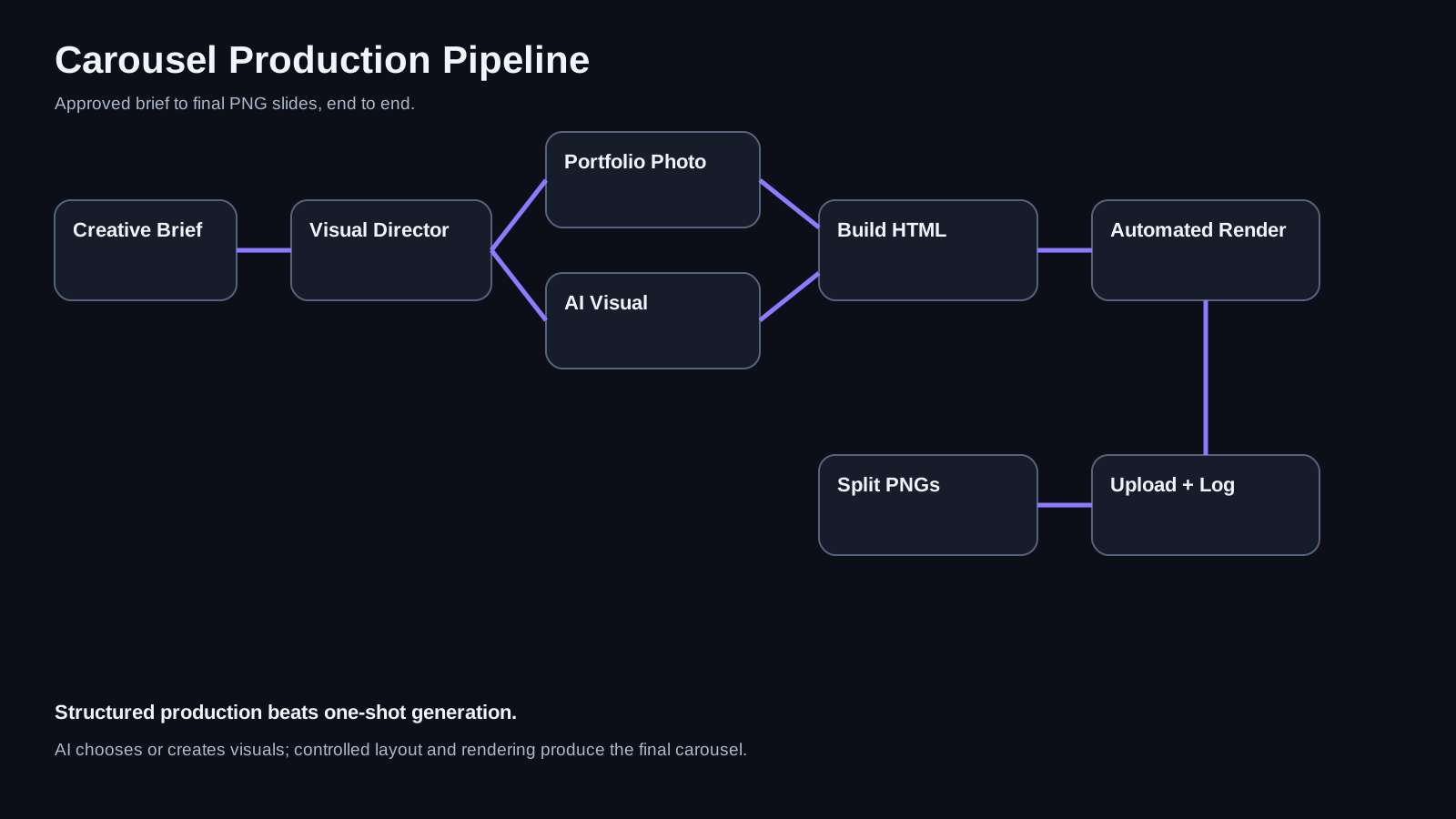
Shows the current automated flow from approved brief to final PNG carousel slides.
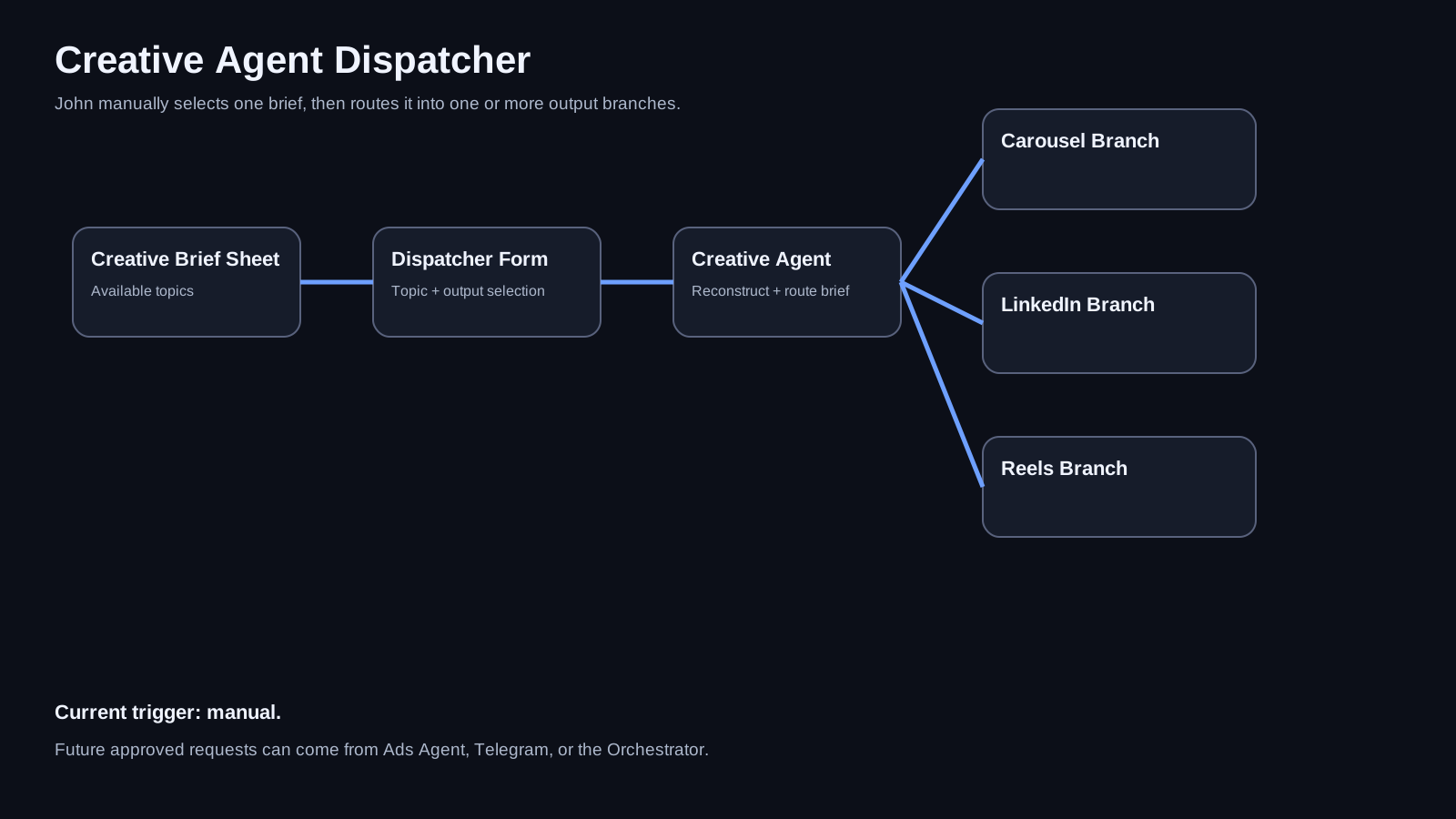
John selects a brief manually, then routes it into Carousel, LinkedIn, Reels, or multiple outputs.
Operational production layer
- The Creative Agent Dispatcher is active, has a live production URL, and is used to trigger creative jobs manually.
- The same Dispatcher can route a selected brief into Carousel, LinkedIn, and Reels branches.
- Carousel is the most mature branch and now works end to end through final PNG slide generation, upload, logging, and Telegram delivery.
- The LinkedIn branch has its own generation, upload, and failure path inside the Creative Agent.
- The Reels branch automates video job submission, polling, timeout handling, download, upload, sheet update, and success notification.
- Shared failure handling covers selected high-risk nodes across all three branches.
Move from generation toward a fuller creative operating loop
- Upgrade Reels from video generation into a fuller editing workflow with clip selection, sequencing, trimming, overlays, subtitles, audio, and final rendering.
- Add more carousel layout variants where the content needs step lists, quote structures, comparisons, or other visual treatments.
- Tighten handoff to the Social Agent while keeping a clear human review and publishing gate.
- Later replace the manual Dispatcher trigger with approved requests from the Marketing Ads Agent, Telegram interface, or future Orchestrator.
Key takeawayThe useful breakthrough was not asking AI to be more creative. It was deciding which creative jobs should be generative, which should be structured, and which should remain human.
Start a conversation